
CSS Nesting Guide
Target version: Vivliostyle.js v2.42 (2026-04-25) Vivliostyle CLI v10.6 bundles Viewer 2.42, so the feature is available out of the box.
Published: 2026-05-14 Last updated: 2026-05-14
The CSS Nesting Module lets you write child rules inside a parent rule. In plain CSS you repeat the parent selector — .chapter { ... } .chapter h2 { ... } and so on — but with nesting you write the child rules once, grouped inside .chapter { }.
.chapter {
  font-family: 'Source Serif Pro', serif;

  & h2 {
    font-size: 1.4em;
    border-bottom: 1px solid currentColor;
  }

  & p:first-of-type::first-letter {
    font-size: 3em;
    float: left;
    margin-right: 0.1em;
  }
}
This expands to:
.chapter { font-family: 'Source Serif Pro', serif; }
.chapter h2 { font-size: 1.4em; border-bottom: 1px solid currentColor; }
.chapter p:first-of-type::first-letter { font-size: 3em; float: left; margin-right: 0.1em; }
The leading & on a child rule is optional — h2 { ... } means the same thing. This guide keeps the & to make the nesting explicit.
Where it pays off in typesetting
1. Nesting pseudo-elements (works with Vivliostyle's typesetting pseudo-elements too)
CSS Nesting in Vivliostyle.js v2.42 also works with the CSS GCPM pseudo-elements that Vivliostyle handles at typesetting time, such as ::footnote-call and ::footnote-marker. This lets you define footnote styles in a single block.
.footnote {
  float: footnote;

  &::footnote-call {
    content: "Note " counter(footnote);
  }

  &::footnote-marker {
    content: "Note " counter(footnote) ": ";
  }
}
You can use .footnote to mark text as a footnote and define both the in-flow call marker and the footnote-area marker in the same scope.
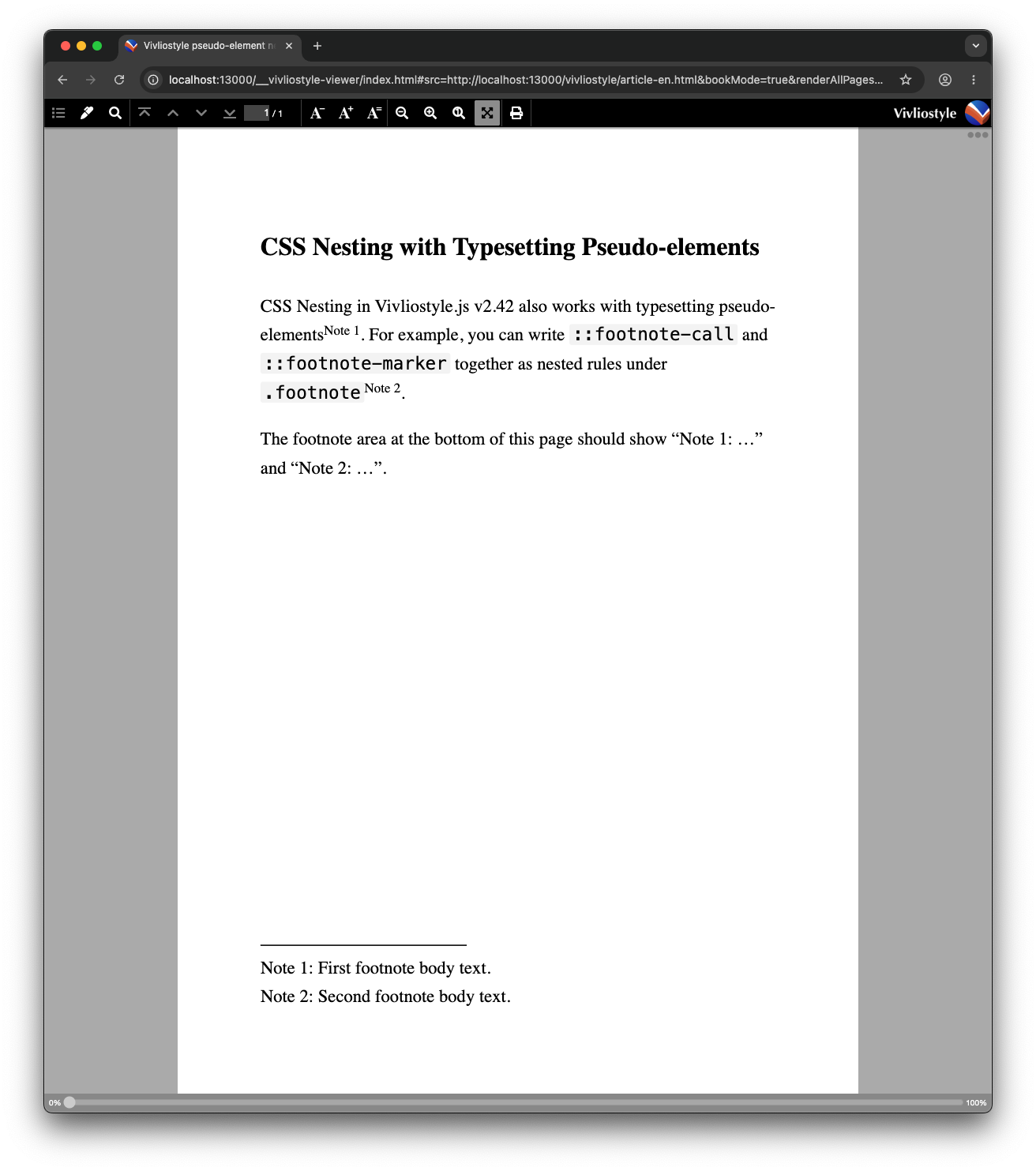
HTML source
<p>CSS Nesting in Vivliostyle.js v2.42 also works with typesetting pseudo-elements<span class="footnote">First footnote body text.</span>. For example, you can write <code>::footnote-call</code> and <code>::footnote-marker</code> together as nested rules under <code>.footnote</code><span class="footnote">Second footnote body text.</span>.</p>
<p>The footnote area at the bottom of this page should show "Note 1: …" and "Note 2: …".</p>
Credit: post by メイユール (@u1f992)
2. Inlining @media
You can place @media print next to the rule it modifies, which makes it easy to separate preview-only decoration from print output.
.cover {
  background: var(--cover-bg);

  @media screen {
    box-shadow: 0 4px 16px rgba(0,0,0,0.2);
  }

  @media print {
    box-shadow: none;
    break-after: page;
  }
}
Migrating existing themes
- Adding to an existing CSS file: you can write nested rules directly in your current theme CSS. No configuration change is needed.
Known limits
- You can nest rules (
@page,@media, class/element selectors). You cannot nest properties.
Related guides
- Footnotes — footnote features were also expanded in v2.42
- CMYK Conversion
- Page Groups