
Footnotes Guide
Target versions: Vivliostyle.js v2.41+ (released 2026-04-11), Vivliostyle CLI v10.5+ Published: 2026-05-05 Last updated: 2026-05-14
This guide explains the methods for working with footnotes in Vivliostyle.js (and VFM), and how to customize footnote presentation.
Overview
The methods available in Vivliostyle for producing footnotes, together with their configuration and required CSS:
| What you want | vivliostyle.config.js |
Theme / CSS | Result |
|---|---|---|---|
| Endnotes (end of document) | vfm: { footnote: 'pandoc' } (default) |
Not required | Endnote section at document end |
| Footnotes written directly in HTML (CSS (raw HTML) | theme-base / theme-techbook | float: footnote based footnote |
class) |
| GCPM) | vfm: { footnote: 'gcpm' } |
theme-base / theme-techbook | CSS-class based footnote |
| DPUB) | vfm: { footnote: 'dpub' } |
Not required (supported in v2.41) | DPUB-ARIA based footnote |
About footnote recognition mechanisms
There are two distinct HTML markup methods that Vivliostyle recognises as footnotes, each originating from a different source.
CSS GCPM (CSS Generated Content for Paged Media) is a specification designed by W3C for CSS typesetting in paged media (CSS GCPM 3). Applying a CSS class that includes float: as defined in this to HTML elements produces footnote floats. Vivliostyle bundles this style in theme-base / theme-techbook and has supported it since before v2.41.spec footnote
DPUB-ARIA (Digital Publishing WAI-ARIA) is W3C's extension to ARIA roles designed for the accessibility of digital publications such as EPUB (DPUB-ARIA 1.1). Notes are marked up using the role="doc-noteref" / role="doc-footnote" HTML role attributes. Vivliostyle.js v2.41 adds support, allowing footnotes without any theme CSS.
| Mechanism | Origin | HTML pattern | Theme CSS |
|---|---|---|---|
| CSS GCPM | CSS Generated Content for Paged Media | <span class="footnote"> |
A theme with .footnote { float: footnote } is required (theme-base / theme-techbook) |
| DPUB-ARIA (new in v2.41) | W3C DPUB-ARIA 1.1 | <a role="doc-noteref"> → <aside role="doc-footnote"> |
Not required (supported in v2.41) |
How to produce footnotes
CSS direct markup (GCPM class method)
The most direct way to author footnotes is to mark them in HTML:
<p>The text<span class="footnote">A footnote.</span> continues here.</p>With a theme that includes .footnote { float: footnote } (such as theme-base or theme-techbook), the contents of <span class="footnote"> is moved to the page-bottom footnote area at layout time. The reference number and the marker in the footnote area are generated through the ::footnote-call and ::footnote-marker pseudo-elements.
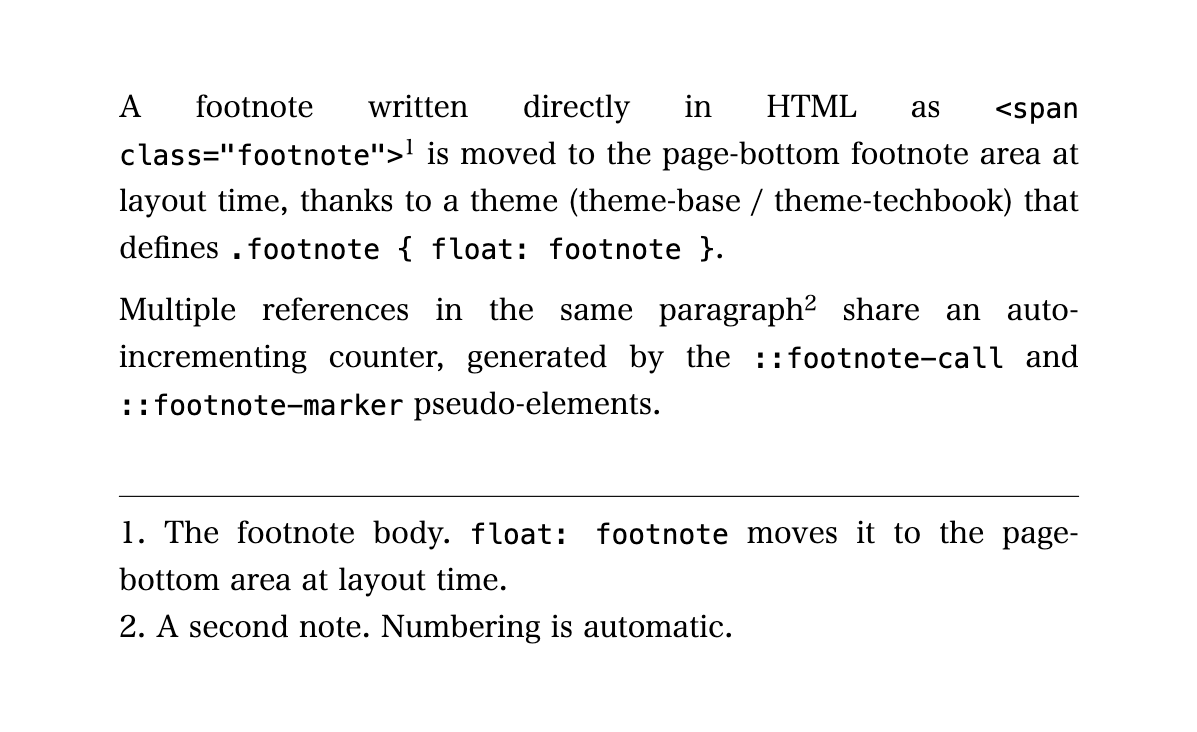
VFM Markdown source
---
title: "Example 1: HTML class footnote (theme-base style)"
vfm:
  footnote: gcpm
---

A footnote written directly in HTML as `<span class="footnote">`[^1] is moved to the page-bottom footnote area at layout time, thanks to a theme (theme-base / theme-techbook) that defines `.footnote { float: footnote }`.

Multiple references in the same paragraph[^2] share an auto-incrementing counter, generated by the `::footnote-call` and `::footnote-marker` pseudo-elements.

[^1]: The footnote body. `float: footnote` moves it to the page-bottom area at layout time.

[^2]: A second note. Numbering is automatic.
VFM-generated HTML (body only)
<p>A footnote written directly in HTML as <code><span class="footnote"></code><span class="footnote" id="fn-1" role="doc-footnote">The footnote body. <code>float: footnote</code> moves it to the page-bottom area at layout time.</span> is moved to the page-bottom footnote area at layout time, thanks to a theme (theme-base / theme-techbook) that defines <code>.footnote { float: footnote }</code>.</p>
<p>Multiple references in the same paragraph<span class="footnote" id="fn-2" role="doc-footnote">A second note. Numbering is automatic.</span> share an auto-incrementing counter, generated by the <code>::footnote-call</code> and <code>::footnote-marker</code> pseudo-elements.</p>DPUB-ARIA role method (#1700, PR#1703)
Vivliostyle.js v2.41 recognises footnotes from DPUB-ARIA roles directly:
<p>The text<a role="doc-noteref" href="#fn1">1</a> continues.</p>
<aside id="fn1" role="doc-footnote">A note.</aside>
Vivliostyle.js applies float: footnote to [role="doc-footnote"], so this works without any theme CSS. The note appears at the foot of the page, and the in-text reference marker (::footnote-call) is generated automatically.
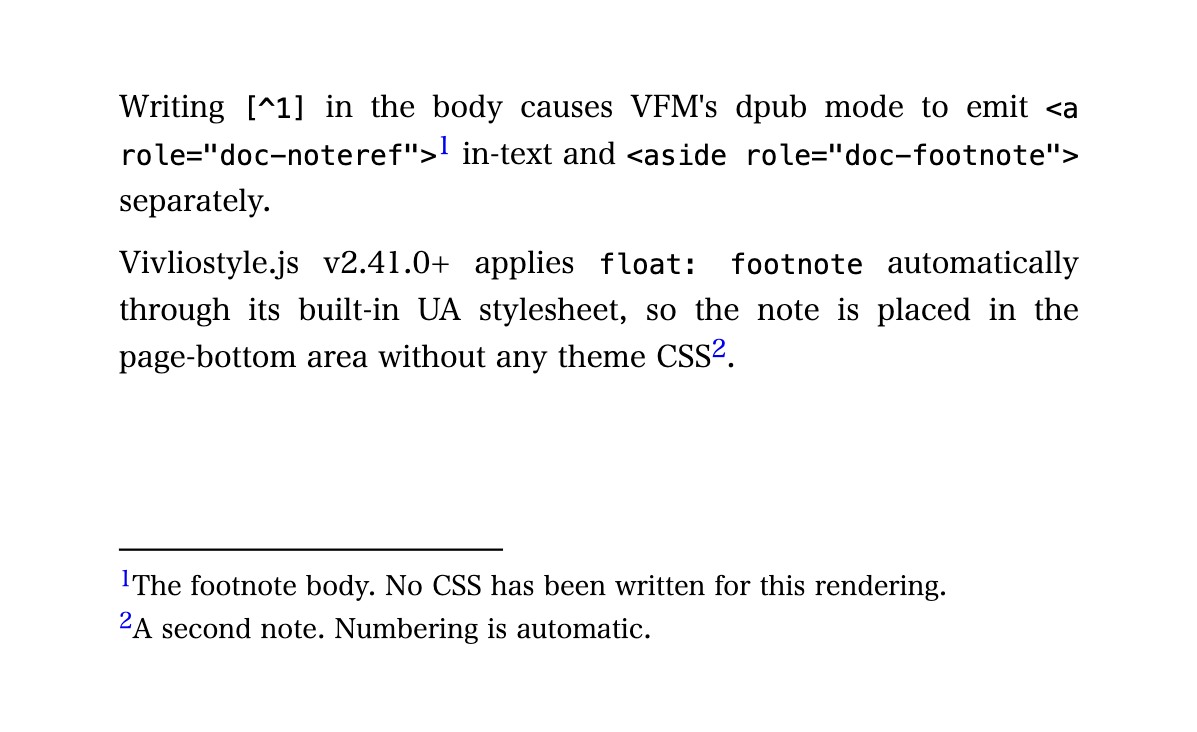
VFM Markdown source
---
title: "Example 3: DPUB-ARIA footnote (no theme CSS)"
vfm:
  footnote: dpub
---

Writing `[^1]` in the body causes VFM's dpub mode to emit `<a role="doc-noteref">`[^1] in-text and `<aside role="doc-footnote">` separately.

Vivliostyle.js v2.41+ applies `float: footnote` automatically, so the note is placed in the page-bottom area without any theme CSS[^2].

[^1]: The footnote body. No CSS has been written for this rendering.

[^2]: A second note. Numbering is automatic.
VFM-generated HTML (body only)
<p>Writing <code>[^1]</code> in the body causes VFM's dpub mode to emit <code><a role="doc-noteref"></code><a id="fnref1" href="#fn1" class="footnote-ref" role="doc-noteref"><sup>1</sup></a> in-text and <code><aside role="doc-footnote"></code> separately.</p>
<p>Vivliostyle.js v2.41+ applies <code>float: footnote</code> automatically, so the note is placed in the page-bottom area without any theme CSS<a id="fnref2" href="#fn2" class="footnote-ref" role="doc-noteref"><sup>2</sup></a>.</p>
<aside id="fn1" class="footnote" role="doc-footnote"><a href="#fnref1" class="footnote-back" role="doc-backlink"><sup>1</sup></a>The footnote body. No CSS has been written for this rendering.</aside>
<aside id="fn2" class="footnote" role="doc-footnote"><a href="#fnref2" class="footnote-back" role="doc-backlink"><sup>2</sup></a>A second note. Numbering is automatic.</aside>Comparison of the two recognition mechanisms
| Mechanism | Origin | Recognised pattern | Theme CSS |
|---|---|---|---|
| CSS GCPM | CSS Generated Content for Paged Media | <span class="footnote"> |
Required |
| DPUB-ARIA | W3C DPUB-ARIA 1.1 | role="doc-noteref" / role="doc-footnote" |
Not required (v2.41) |
The two mechanisms can coexist within the same document, but in practice one of them is chosen per source.
VFM conversion ([^1] notation)
VFM v2.6 introduced the footnote option (PR#226, PR#231). The HTML generated from Markdown's [^1] notation differs by mode:
'pandoc'( Generates endnotes. Placed at the end of the document as<section role="doc-endnotes">. Not subject tofloat: footnote, and@footnotestyling has no effect.default)' Generates. Theme CSS withfloat: footnote(theme-base / theme-techbook) is required.gcpm'' Generates
In vivliostyle.config.js:
export default {
  vfm: {
    footnote: 'dpub',
  },
  // ...
};
pandoc mode (endnotes) example
Up to and including VFM v2.5.x, [^1] notation in Markdown produced endnotes in Pandoc's output style:
Some text.[^1]

[^1]: A note.
VFM converts this into a <section role="doc-endnotes"> block placed at the end of the document body. Because endnotes flow inline with the main text, float: footnote does not apply, and @footnote styling has no effect on them.
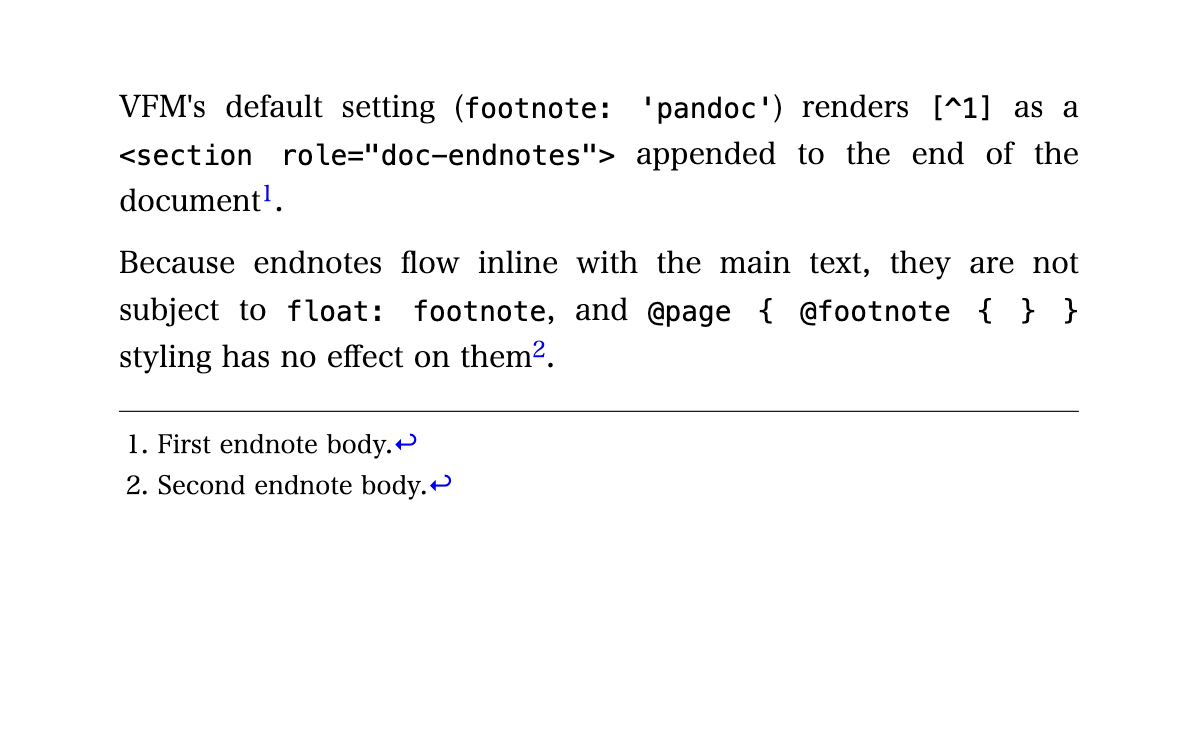
VFM Markdown source
---
title: "Example 2: VFM Pandoc-style endnotes"
vfm:
  footnote: pandoc
---

VFM's default setting (`footnote: 'pandoc'`) renders `[^1]` as a `<section role="doc-endnotes">` appended to the end of the document[^1].

Because endnotes flow inline with the main text, they are not subject to `float: footnote`, and `@page { @footnote { } }` styling has no effect on them[^2].

[^1]: First endnote body.

[^2]: Second endnote body.
VFM-generated HTML (body only)
<p>VFM's default setting (<code>footnote: 'pandoc'</code>) renders <code>[^1]</code> as a <code><section role="doc-endnotes"></code> appended to the end of the document<a id="fnref1" href="#fn1" class="footnote-ref" role="doc-noteref"><sup>1</sup></a>.</p>
<p>Because endnotes flow inline with the main text, they are not subject to <code>float: footnote</code>, and <code>@page { @footnote { } }</code> styling has no effect on them<a id="fnref2" href="#fn2" class="footnote-ref" role="doc-noteref"><sup>2</sup></a>.</p>
<section class="footnotes" role="doc-endnotes">
<hr>
<ol>
<li id="fn1" role="doc-endnote">First endnote body.<a href="#fnref1" class="footnote-back" role="doc-</a></li>backlink">
<li id="fn2" role="doc-endnote">Second endnote body.<a href="#fnref2" class="footnote-back" role="doc-</a></li>backlink">
</ol>
</section>Object form of the footnote option
Beyond the three string values, footnote also accepts an object { mode, body } that lets you customise the generated HTML:
vfm: {
  footnote: {
    mode: 'gcpm',
    body: (h, props, children) =>
      h('span.footnote', props, h('span.footnote-wrap', ...children)),
  },
}
The intended use case is keeping styling-only DOM transformations (such as adding a wrapper for hanging indent) out of the Markdown source. Authors write plain Markdown footnotes; the build configuration applies the wrapper.
Per-file configuration via YAML frontmatter
The footnote mode can also be set per file in YAML frontmatter, overriding the global config:
---
vfm:
  footnote: dpub  # or pandoc, gcpm
---
This is convenient when most of the project uses the project-wide default but a single file needs a different mode.
Customizing footnotes
footnote-display property (#1825)
Lays out footnote bodies in different ways. The property goes on the footnote element itself (not inside @footnote):
block(default) — each footnote on its own lineinline— multiple footnotes flow on the same linecompact— short footnotes flow inline; notes that don't fit on one line fall back to block
.footnote { footnote-display: inline; }VFM Markdown source (footnote-display: inline)
---
title: "Example: footnote-display: inline"
vfm:
  footnote: gcpm
---

With `footnote-display: inline`, multiple footnotes flow on the same line[^1]. Three short references[^2] in a row[^3] still keep the footnote area compact in the vertical direction.

[^1]: A short note.

[^2]: Another short note.

[^3]: A third short note.
VFM-generated HTML (body only)
<p>With <code>footnote-display: inline</code>, multiple footnotes flow on the same line<span class="footnote" id="fn-1" role="doc-footnote">A short note.</span>. Three short references<span class="footnote" id="fn-2" role="doc-footnote">Another short note.</span> in a row<span class="footnote" id="fn-3" role="doc-footnote">A third short note.</span> still keep the footnote area compact in the vertical direction.</p>With compact, short notes stay inline and long notes fall back to block automatically.
list-style-position: outside for ::footnote-marker (#1702)
The footnote marker now respects list-style-position, so the marker can sit outside the footnote body to produce a hanging-indent presentation:
.footnote { margin-inline-start: 1.5em; }
.footnote::footnote-marker {
  content: counter(footnote) ". ";
  list-style-position: outside;
}
VFM Markdown source
---
title: "Example: ::footnote-marker with list-style-position: outside"
vfm:
  footnote: gcpm
---

Setting `list-style-position: outside` on `::footnote-marker` places the marker outside the footnote body[^1]. Continuation lines align with the body's left edge rather than under the marker[^2], which makes long footnotes easier to read.

[^1]: This note's number hangs to the left of the body. Continuation lines align with the left edge of the body, not under the number, producing a clean hanging indent.

[^2]: A second note with hanging indent applied.
VFM-generated HTML (body only)
<p>Setting <code>list-style-position: outside</code> on <code>::footnote-marker</code> places the marker outside the footnote body<span class="footnote" id="fn-1" role="doc-footnote">This note's number hangs to the left of the body. Continuation lines align with the left edge of the body, not under the number, producing a clean hanging indent.</span>. Continuation lines align with the body's left edge rather than under the marker<span class="footnote" id="fn-2" role="doc-footnote">A second note with hanging indent applied.</span>, which makes long footnotes easier to read.</p>Page-scoped reset and cross-scope counters
Footnote counters can now be reset per page group, which is useful for books that restart footnote numbering at each chapter. Use counter-reset together with the named-page mechanism described in the Page Groups guide.
CSS property list
| Property / at-rule | Purpose |
|---|---|
float: footnote |
Move a flow-level element to the page-bottom footnote area |
footnote-display |
block / inline / compact |
footnote-policy |
Control whether a note may be split across pages |
::footnote-call |
Pseudo-element for the in-text reference marker |
::footnote-marker |
Pseudo-element for the marker shown beside the note body |
Summary
The note kinds available through VFM, with their notation, configuration, and CSS:
| Note kind | VFM markup | vivliostyle.config.js |
Theme / CSS | Notes |
|---|---|---|---|---|
| Endnotes | [^1] |
vfm: { footnote: 'pandoc' } (default) |
Not required (rendered as <section role="doc-endnotes"> in normal flow) |
@footnote does not apply |
| Footnotes (CSS class) | [^1] |
vfm: { footnote: 'gcpm' } |
A theme with .footnote { float: footnote } is required (theme-base / theme-techbook) |
Emitted as <span class="footnote">. New in VFM v2.6 |
| Footnotes (DPUB-ARIA) | [^1] |
vfm: { footnote: 'dpub' } |
Not required (supported in v2.41) | Emitted as <aside role="doc-footnote">. New in VFM v2.6. Slated to become the default (#234) |
Not supported by the VFM footnote modes (pandoc / gcpm / dpub). Sidenotes require custom HTML + CSS |
** | Sidenotes** |
Choosing between gcpm and dpub:
- dpub works out of the box without theme CSS. Slated to become the default.recommended
- when compatibility with existing themes (theme-base / theme-techbook) is required, or when you want to use the object-form
bodycallback to customise the generated HTML.gcpm
References
- W3C CSS GCPM 3 §2 Footnotes
- W3C DPUB-ARIA 1.1 (definitions of
doc-noteref/doc-footnote) - W3C JLReq §4.2 Processing of Notes
- Qiita: @u1f992 Using the footnote feature of Vivliostyle.js v2.41 (CLI v10.5) from Markdown
- Test cases:
vivliostyle.js/packages/core/test/files/footnotes/ - VFM source:
vfm/src/plugins/footnotes.ts, PR#226, PR#231 - VFM Issue #234 (planned default switch to dpub)
- Themes:
theme-base/css/partial/footnote.css,theme-techbook/theme.css